
Skip to content
Menu
Smartttips Smartttips
  • Home
  • About Us
    • Privacy Policy
  • Web Tips
    • PHP Tips
      • CodeIgniter
      • Yii Framework
      • SocialEngine
      • zendframework
      • SQL
    • jQuery
    • CSS
    • Internet
    • Google
    • whatsApp
    • Soma Messenger
    • Useful Sites
  • General Tips
    • Top 10 Lists
    • Onam wishes and Greetings
    • Travel and Tourism
  • Free Web Tools
    • English To Malayalam Converter
    • Malayalam To English Converter
    • English To Tamil Converter
    • Manglish To Malayalam Converter
    • Other Free Web Tools
  • Jobs
  • Contact
Smartttips Smartttips

Simple tips to boost your home WiFi

Posted on May 25, 2017 by smarttips

Download and install a free WiFi analyzer app on the phone. I am suggesting Farproc’s WiFi Analyzer for Android is available in the Google Play store. The app shows signal level strength graphically. Check around your home, find the existing WiFi signal strength in distant corners. Depending on several reasons the signal level differ. Check the following things to boost your existing WiFi signal.
1. Place Your WiFi router in center of home/Office

WiFi Position is very important. keep it central. Find the central position in the home for placing router/switch.
Try to get some Quality Ethernet Cat 6 cable and runs the wire to the most central area you can for fixing router.
Remember radio waves mostly spread out towards the ground, not up. So keep the router high position is recommended by the technicians.

2. Limit the number of devices
The number of users very badly affect the speed of WIFI. Wifi router has the option to set the number of devices allowed to connect.
Use it and check how many devices are regularly connecting to the router. If unwanted users there, remove and block them.

3. Use Wifi Repeaters/access point to strengthen the signal

Wifi repeater/access point is ok to improve the signal strength. Easy steps to do this. Install this device and configure wifi repeater.
These devices are boosting up the signal.


How to configure a wifi repeater

1. Plug the Repeater/Extender to a reliable AC power outlet.

2. Connect your Repeater/Extender to your computer using an RJ-45 Ethernet cable.

3. Configure your system’s IP address to be in the same network domain with the Repeater/Extender.

• IP address: 192.168.10.x (x = any number from 2-254)
• Subnet mask: 255.255.255.0
• Default gateway: 192.168.10.1
• DNS server addresses: Leave blank

4. Open a browser and enter 192.168.10.1
into the address bar and hit Enter.

5. change the username and password(suggest to use the same as router)

4. Change your Wi-Fi password regularly
At the time installation, some basic password is using. So a person with some basic computer knowledge can easily guess the password
If you share your password with friends, neighbors, then there is a great chance of reach the wifi password in many hands without your knowledge.

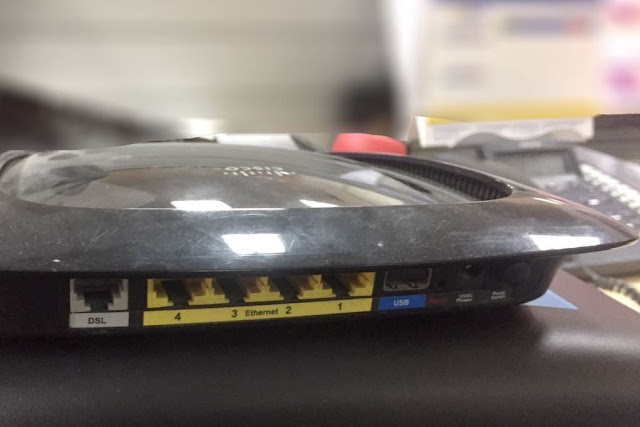
5. Using a USB router

Check the ports on your router. Mostly you can see a USB port, your WiFi router can accomplish something other than work as a simple router. Based on the USB model, USB port can be utilized to associate an outer hard drive (this will be accessible as system storage to every single associated gadget) or to interface a printer (this will make the printer shareable and offer it with anybody on the system).

Post Views: 1,657

Leave a Reply Cancel reply

Your email address will not be published. Required fields are marked *

Type to Search

Popular Posts

  • Find Vehicle ownership Details in Kerala-Through vahan Online
  • Free Online Tools for Web Statistics
  • PhpMyAdmin Login error – Login without a password is forbidden
  • Increase PHP Script Execution Time in zendframework ?
  • Umm Al Quawain Zoo-The Zoo Wildlife Park-Zoo In UAE

Categories

  • Android
  • Apple
  • Automobile
  • Banking
  • Bevco
  • BevQ App
  • Business
  • CodeIgniter
  • Computer
  • Cricket-IPL-2020
  • CSS
  • Database
  • Design
  • Digital Marketing
  • Digital marketing jobs
  • Du
  • Easy Malayalam Typing
  • Entertrainment
  • Etisalat
  • Facebook
  • Famous Birthdays
  • FIFA World Cup Live Streaming
  • Food & restaurants
  • Free Web Statistics Tools
  • G K
  • Games
  • General
  • git
  • GK
  • Google
  • Hardware
  • Health
  • Huawei
  • Instagram
  • Internet
  • iOS
  • iPad
  • iPhone
  • Java
  • javaScript
  • Jobs
  • jQuery
  • Kissan Card India
  • lifestyle
  • LiFi
  • Linux
  • Make in India
  • Mobile Phones
  • Movies
  • Ms Excel
  • Networking
  • News
  • Nodejs Framework
  • opencart
  • Opensource
  • Others
  • Outlook
  • photography
  • Photoshop Tips
  • PHP
  • PHP Project Ideas
  • phpMyadmin
  • Politics
  • PUBGMOBILE
  • SEO
  • Server
  • SMO
  • SocialEngine
  • Softwares
  • Soma Messenger
  • Sports
  • SQL
  • Technology
  • Telecom
  • Top 10 Lists
  • Travel and Tourism
  • UAE Directory
  • Uncategorized
  • Useful Sites
  • Vechicles
  • Videos
  • Web Designer
  • Web Tips
  • whatsApp
  • WiFi
  • Windows
  • windows 10
  • windows 11
  • wordpress
  • World
  • Yii Framework
  • youtube
  • zendframework

smart Tags

Android apache Baahubali baahubali releasing date cinima CodeIgniter config charset and UTF-8 Codex content css data usage edge case elementum Facebook famous birthdays Fast youTube video downloading featured image General Knowledge google Google chrome how to lose weight fast with exercise how to lose weight fast without exercise how to lose weight in 7 days HTML Color Codes iconv() detect illegal char in input image iOS iPad javascript jQuery Kerala Maecenas Microsoft Excel microsoft windows 10 Movies Mysql PHP php job vacancy php zend framework SocialEngine SQL Commands sundar pichai template ubuntu web tips zend framewrok
©2026 Smartttips | Powered by Superb Themes
We use cookies to ensure that we give you the best experience on our website. If you continue to use this site we will assume that you are happy with it.