
Let us see how to Register for the Covid19 Vaccine in India. A year ago everything about the world changed as we encountered a new pandemic. The covid19 virus which originated in the Wuhan premise of China spread through the world creating widespread damages across the world. India has done an impressive job in handling the pandemic and we have also successfully developed vaccines against the virus.
The vaccination drive in the country is prioritised based on occupation and age. Vaccines were first given to Health workers who are at the frontline fighting the virus. The vaccination for Health workers is nearing its end. Now the vaccination is open to the public. Citizens aged above 60 are given the first preference. People have to register online for the vaccine and approach the selected centre for getting the vaccination on the allotted date.
We will guide you through the step by step instruction on how to Register for the Covid 19 vaccine.
How to register for Covid Vaccination via CoWIN portal-Malayalam
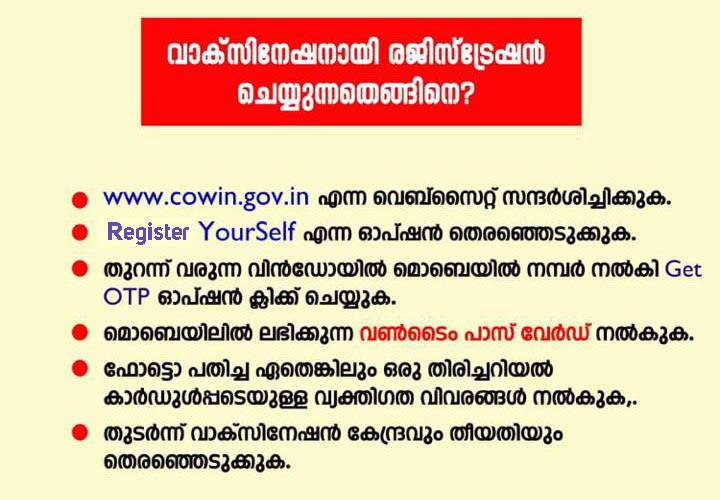
How to register for Covid Vaccination via CoWIN portal -English
STEP 1: visit www.cowin.gov.in/home
STEP 2: Click on the Register Yourself option seen on the CoWIN website
STEP 3: Enter your mobile number and click on the Get OTP option
STEP 4: You will receive an OTP (One Time Password) on the mobile number you entered in the previous step via SMS. Enter the OTP in the respective field and click Verify OTP.
STEP 5: The Registration page for Vaccination will open up. You will be asked to give your personal details, such as details of any Government Approved Photo ID proof.
You will also be asked whether you have any comorbidities (Any existing illness or health conditions). You can select a Yes if you have any or answer with a No.
Once you have filled all the fields, click the `Register` button at the bottom of the page.
STEP 7: You will receive a confirmation SMS on the mobile number given. Which indicate that Your registration for the covid19 vaccine is successful.
STEP 8: You will be now on the Account Details page. You can select a date according to your convenience and the nearest centre for Vaccination. Click on the Schedule Appointment and the Registration process is Complete.
Now you can Visit the Vaccination centre on the respective date and get yourself Vaccinated.
How to register for covid Vaccine via Aarogyasetu
- Open the Aarogyasetu app on your mobile device.
- Click on the CoWIN tab on homescreen.
- Select Vaccine Registration and follow the procedures from STEP 3 above.